
Is an e-reader a practical solution for a senior with declining eyesight or difficulty holding a book?
The Kindle Paperwhite addresses two of the most common reading barriers for seniors simultaneously. Font size is fully adjustable — from comfortable to very large — without reformatting the text, so a senior who struggles with small print can read any book without seeking a large-print edition. The device weighs 211g, far less than most hardbacks, and can be held in one hand.
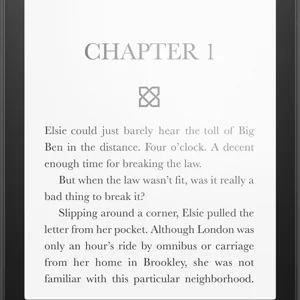
Kindle Paperwhite (12th Gen)
Adjustable warm backlight, font up to 28pt, waterproof — millions of titles on a 7-inch glare-free screen, with no lockscreen ads.
Key Features
- Adjustable warm backlight reduces eyestrain in any environment
- Font sizes up to 28pt — larger than any physical large-print book
- Waterproof — safe to read in the bath or by the pool
Best for
Seniors who love reading but struggle with heavy books or small print. Adjustable font, glare-free screen, and thousands of titles available instantly.
One of the most consistently well-received tech gifts for a reading parent. Lightweight, glare-free, waterproof — just connect to home Wi-Fi and it is ready.
Worth knowing
Kindle books are DRM-protected — content stays in the Amazon ecosystem. This is the edition without lockscreen advertising, which costs a little more and is worth it for a reader who would be confused by an unexpected screen on waking the device.
I may earn a commission if you buy through this link, at no extra cost to you.
As an Amazon Associate I earn from qualifying purchases.
How this works
Is a Kindle Paperwhite good for seniors?
Frequently Asked Questions
Yes — font sizes go up to 28pt, larger than standard large-print books.
Yes — the Paperwhite is fully waterproof.
How does it compare?
Other options in this category worth considering.
| Product | Price | Best for |
|---|---|---|
| Kindle Paperwhite (12th Gen) This pick | See Amazon | Seniors who love reading but struggle with heavy books or small print. Adjustable font, glare-free screen, and thousands of titles available instantly. | One of the most consistently well-received tech gifts for a reading parent. Lightweight, glare-free, waterproof — just connect to home Wi-Fi and it is ready. |
| Ideerfit 28-Day Automatic Pill Dispenser | See Amazon | Seniors on a once-daily round whose hands make weekly boxes and fiddly lids the real obstacle. | A gift that automates the pill schedule for a parent who has refused every gadget that needs setting up. |
| Chromebook with Senior Setup | See Amazon | Seniors who want a laptop purely for email, video calls, and browsing — nothing to maintain, update manually, or worry about. Automatic updates, no antivirus needed. | A low-maintenance laptop gift for a parent who just wants email and video calls without the upkeep of a Windows PC or the cost of a Mac. Always up to date. |
| Clarity E814CC Amplified Telephone | See Amazon | Seniors with hearing loss who want a phone that amplifies incoming sound with large clearly labeled buttons and no learning curve at all. | A practical gift for a parent who has been struggling to hear calls — plug it in and it works immediately, no setup, no pairing, no app. |
Prices are approximate ranges — check each retailer for today's price.
More in this category
Browse Adaptive TechLast updated: .