
Why do many technology advisers recommend a Chromebook as the best first computer for a reluctant senior?
Windows laptops require ongoing maintenance — updates, antivirus management, storage cleaning — that creates friction for users who simply want to check email and video call family. A Chromebook updates itself silently, is inherently resistant to malware, starts in under ten seconds, and costs a fraction of a comparable Windows device. The interface is closer to a tablet than a traditional desktop.
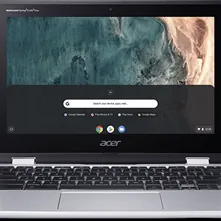
Chromebook with Senior Setup
Virus-free laptop with automatic updates — boots in 10 seconds, ideal for email and browsing.
Key Features
- Automatic updates — no manual patches or security decisions required
- Virus-free by design — no antivirus software needed
- Boots in under 10 seconds — no frustrating startup delays
Best for
Seniors who want a laptop purely for email, video calls, and browsing — nothing to maintain, update manually, or worry about. Automatic updates, no antivirus needed.
A low-maintenance laptop gift for a parent who just wants email and video calls without the upkeep of a Windows PC or the cost of a Mac. Always up to date.
Worth knowing
Not suitable for Windows-specific software or heavy photo/video editing
I may earn a commission if you buy through this link, at no extra cost to you.
As an Amazon Associate I earn from qualifying purchases.
How this works
Is a Chromebook a good laptop for seniors?
The case for a Chromebook over a Windows laptop for an older beginner is mostly about what is absent. Nothing to install and maintain, no license to renew, no subscription to forget about, and nothing that meaningfully slows down across three years of use. Most of the support calls an adult child fields about a parent's laptop trace back to one of those four things.
The trade-off is real and worth being straight about. Chrome OS runs web applications, so anything requiring installed Windows or Mac software — a particular tax package, some photo editors, older printer utilities — either has a web equivalent or simply does not run. For someone whose computing is email, browsing, video calls, photos and documents, that limit never comes up. For someone with one essential legacy program, it is a dealbreaker.
Frequently Asked Questions
No — Chromebooks are virus-free by design and update automatically.
Chromebooks use Google Docs, not Microsoft Word — suitable for most writing needs.
How does it compare?
Other options in this category worth considering.
| Product | Price | Best for |
|---|---|---|
| Chromebook with Senior Setup This pick | See Amazon | Seniors who want a laptop purely for email, video calls, and browsing — nothing to maintain, update manually, or worry about. Automatic updates, no antivirus needed. | A low-maintenance laptop gift for a parent who just wants email and video calls without the upkeep of a Windows PC or the cost of a Mac. Always up to date. |
| Ideerfit 28-Day Automatic Pill Dispenser | See Amazon | Seniors on a once-daily round whose hands make weekly boxes and fiddly lids the real obstacle. | A gift that automates the pill schedule for a parent who has refused every gadget that needs setting up. |
| Kindle Paperwhite (12th Gen) | See Amazon | Seniors who love reading but struggle with heavy books or small print. Adjustable font, glare-free screen, and thousands of titles available instantly. | One of the most consistently well-received tech gifts for a reading parent. Lightweight, glare-free, waterproof — just connect to home Wi-Fi and it is ready. |
| Clarity E814CC Amplified Telephone | See Amazon | Seniors with hearing loss who want a phone that amplifies incoming sound with large clearly labeled buttons and no learning curve at all. | A practical gift for a parent who has been struggling to hear calls — plug it in and it works immediately, no setup, no pairing, no app. |
Prices are approximate ranges — check each retailer for today's price.
More in this category
Browse Adaptive TechLast updated: .